
LINE commands and menu
After LINE is connected, you can either type slash commands directly or use the メニュー at the bottom of the chat for common actions.
Option 1: Type slash commands
Section titled “Option 1: Type slash commands”Send one of these commands in the LINE chat.
| Command | What it does |
|---|---|
/pair | Connect KuraID |
/account | Check KuraID |
/usage | View usage status |
/unpair | Disconnect |
/feedback | Report a problem |
/clearsession | Reset session history |
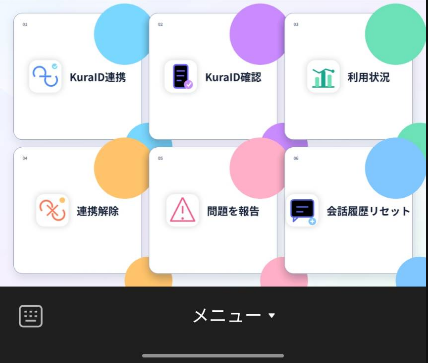
Option 2: Use the bottom menu
Section titled “Option 2: Use the bottom menu”Open the LINE chat with Kura-chan, tap メニュー at the bottom, then choose the action you want to run.
What’s next
Section titled “What’s next”If LINE is not connected yet, go back to Connect LINE. After connecting, continue to Chat with Kura-chan.